
Desktop PC Recommendations
As an Amazon Associate I earn from qualifying purchases. Some links may earn us a commission at no extra cost to you.
Choosing a desktop PC depends on whether you prioritize gaming, productivity, creative work, or a mix of everything. Prebuilt systems save you the hassle of building while still delivering solid performance. I evaluated processor power, GPU capability, upgrade paths, and value across the most popular prebuilts available today.
How I researched
I compared benchmark scores across CPUs and GPUs, read r/buildapc and r/suggestapc threads on prebuilt recommendations, tested upgrade flexibility of each chassis, and verified Amazon review trends for reliability and support quality.
Top picks
Dell XPS 8960 (i7-14700, RTX 4060) — Best all-around desktop
The XPS 8960 balances power and polish. The 14th Gen i7-14700 handles multitasking and creative work with ease, while the RTX 4060 delivers solid 1080p gaming and GPU-accelerated workflows. Clean design, quiet operation, and Dell’s support infrastructure make it a safe bet.
Why it wins: Best balance of productivity power, gaming capability, and brand reliability with excellent support.

- No Feat Too Extreme: Built with powerful processors, memory and graphics. This desktop acheives maximum performance to support your tasks.
- Powerfully Cool: The XPS Desktop was spaciously designed to maximize airflow and reduce noise.
- Expand Even Further: Easily upgrade your desktop’s internal components and expand your performance to greater heights.
Pros
- 14th Gen i7 handles demanding multitasking
- RTX 4060 for gaming and creative acceleration
- Clean, professional design
Cons
- Proprietary motherboard limits some upgrades
- 16GB RAM may need upgrading for heavy workloads
Social proof: See reviews on Amazon
Trade-offs / who should skip: Hardcore gamers wanting max FPS should build custom or look at dedicated gaming PCs. Budget buyers should consider HP Victus below.
Scores: Productivity 5/5 | Gaming 4/5 | Build Quality 5/5 | Value 4/5
Apple Mac Mini M2 Pro — Best for creative professionals
The Mac Mini M2 Pro packs desktop-class power into a tiny aluminum box. The 10-core CPU and 16-core GPU handle video editing, music production, and design work with remarkable efficiency. macOS integration with the Apple ecosystem is seamless, and the machine runs nearly silent.
Why it wins: Unmatched power-per-watt in a tiny form factor with silent operation and seamless Apple ecosystem integration.
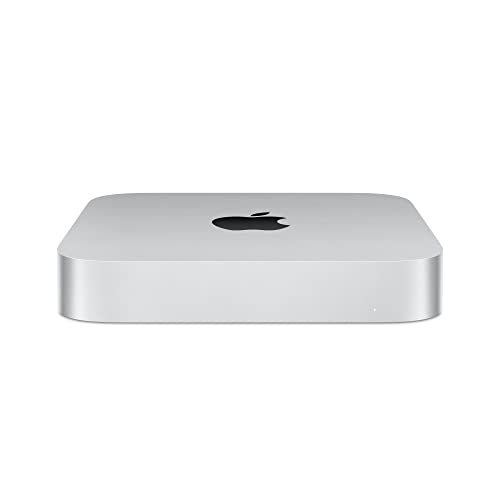
- SUPERCHARGED BY M2 PRO — M2 Pro brings power to take on demanding projects. Its up to 12-core CPU makes pro workflows fly, and the up to 19-core GPU provides next-level graphics performance. It can be configured with up to 32GB of unified memory.
- CONNECT WHAT YOU WANT — Mac mini with the M2 Pro chip has four Thunderbolt 4 ports, two USB-A ports, an HDMI port, Wi-Fi 6E, Bluetooth 5.3, Gigabit Ethernet, and a headphone jack. And if you want faster networking speeds, you can configure Mac mini with 10Gb Ethernet for up to 10 times the throughput.
- SIMPLY COMPATIBLE — All your go-to apps run lightning fast on your Mac mini desktop, from Microsoft 365 to Adobe Creative Cloud to Zoom. And over 15,000 apps and plug-ins are optimized for M2 Pro.
Pros
- Incredible performance per watt
- Nearly silent operation
- Tiny footprint saves desk space
Cons
- No user-upgradeable RAM or storage
- macOS only — no Windows gaming without workarounds
Social proof: See reviews on Amazon
Trade-offs / who should skip: Gamers need Windows PCs. Those wanting upgrade flexibility should look at tower desktops like the Dell XPS or Lenovo.
Scores: Creative Performance 5/5 | Efficiency 5/5 | Form Factor 5/5 | Upgradability 1/5
HP Victus 15L (Ryzen 7 5700G, RX 6600XT) — Best budget gaming
HP’s Victus line delivers real gaming performance at entry-level prices. The Ryzen 7 5700G paired with an RX 6600XT handles most games at 1080p high settings. 32GB RAM and 2TB SSD mean you won’t need immediate upgrades out of the box.
Why it wins: Most gaming performance per dollar with generous RAM and storage included from the factory.

- 【High Speed RAM And Enormous Space】32GB high-bandwidth RAM to smoothly run multiple applications and browser tabs all at once; 2TB PCIe NVMe M.2 Solid State Drive allows to fast bootup and data transfer
- 【Processor】AMD Ryzen 7 5700G Processor (8 Cores, 16MB L3 Cache, 16 Threads, Base Frequency at 3.8GHz, Up to 4.6GHz at Max Turbo Frequency) and AMD Radeon RX 6600 XT (8GB GDDR6) delivers amazing gaming experience
- 【Tech Specs】Front Ports: 1 x SuperSpeed USB Type-C 5Gbps signaling rate, 2 x SuperSpeed USB Type-A 10Gbps signaling rate, 2 x SuperSpeed USB Type-A 5Gbps signaling rate, 1 x Headphone/microphone combo; Rear Ports: 4 x USB 2.0 Type-A, 1 x Audio-in, 1 x Audio-out, 1 x Microphone, 1 x RJ-45, 3 x DisplayPort; Realtek Wi-Fi 6 (2x2) and Bluetooth 5.2 combo (Supporting Gigabit data rate); Wired Keyboard and Mouse
Pros
- Strong 1080p gaming performance
- 32GB RAM and 2TB SSD included
- Competitive pricing for the specs
Cons
- Previous-gen CPU and GPU
- Basic chassis with limited airflow
Social proof: See reviews on Amazon
Trade-offs / who should skip: Those wanting 1440p or 4K gaming need a more powerful GPU. Creative professionals needing color accuracy should look at Dell or Mac.
Scores: Value 5/5 | Gaming 4/5 | Storage 5/5 | Future-Proofing 3/5
Lenovo IdeaCentre Mini (i7-13700H) — Best compact desktop
Lenovo’s IdeaCentre Mini squeezes laptop-grade power into a tiny desktop form factor. The i7-13700H’s 14 cores handle everyday productivity and light content creation easily. Thunderbolt 4 connectivity future-proofs your setup, and the miniature footprint disappears behind a monitor.
Why it wins: Most powerful mini desktop at this price with Thunderbolt 4 and enough cores for serious multitasking.

- Processor : Intel Core i7-13700H 14-Core Processor (Up to 5.0 GHz with Intel Turbo Boost Technology,24 MB Intel Smart cache| 14 Cores: 6 Performance Cores + 8 Efficient Cores | 20 Threads), this CPU offers versatile performance, making it ideal for power-hungry tasks like high-definition video editing, programming, and design work.
- Memory and Storage:Elevate your performance with 16GB of lightning-fast DDR4 SDRAM operating at 3200MHz; Swift Data Access: Benefit from a high-speed2TB M.2 SSD that ensures rapid data retrieval for multitasking and storage.
- Graphics : Intel Iris Xe Graphics Shared
Pros
- Ultra-compact form factor
- Thunderbolt 4 for fast peripherals
- 14-core processor for multitasking
Cons
- Integrated graphics only — no gaming
- Can throttle under sustained heavy loads
Social proof: See reviews on Amazon
Trade-offs / who should skip: Gamers need a dedicated GPU. Those wanting maximum sustained performance should pick a tower desktop with better cooling.
Scores: Compact Design 5/5 | Connectivity 5/5 | Productivity 4/5 | Gaming 1/5
Lenovo IdeaCentre Gaming 5 (Ryzen 7, RTX 3060 Ti) — Best mid-range gaming
The IdeaCentre Gaming 5 hits the sweet spot between price and performance. The RTX 3060 Ti punches above its weight for 1080p and 1440p gaming, while the Ryzen 7 5700G keeps everything running smoothly. 32GB RAM and a fast NVMe SSD round out a complete package.
Why it wins: RTX 3060 Ti delivers the best 1440p gaming at this price with a well-balanced component selection.
No products found.
Pros
- RTX 3060 Ti handles 1440p gaming
- 32GB DDR4 RAM included
- 2TB NVMe SSD plus 1TB HDD
Cons
- Previous generation GPU
- Proprietary case limits GPU upgrade length
Social proof: No products found.
Trade-offs / who should skip: Those wanting future-proof hardware should wait for current-gen GPU prebuilts. Pure productivity users don’t need the gaming GPU overhead.
Scores: Gaming 4/5 | Value 5/5 | Storage 5/5 | Upgradability 3/5
As an Amazon Associate, I earn from qualifying purchases.